

Alerts
Three kinds of alerts, all optional:
| Where it runs | Needs a browser tab open? | Set up in | |
| Desktop | this browser | yes (it can be in the background) | the bell, or Settings → Alerts |
| Discord | the bot (server-side) | no | Settings → Alerts → Discord, or DISCORD_WEBHOOK_URL |
| Telegram | the bot (server-side) | no | TELEGRAM_BOT_TOKEN + TELEGRAM_CHAT_ID |
Desktop and Discord share the same alert types, each with its own toggle.
Desktop alerts (browser)

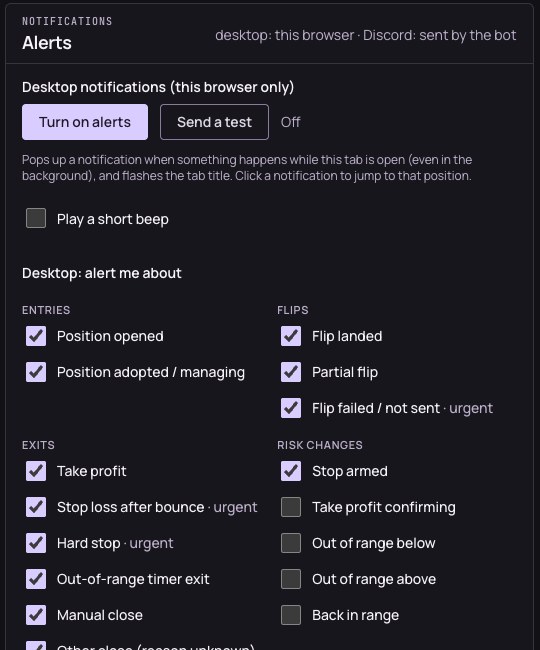
Settings → Alerts: desktop notifications and the per-type list.
Turn them on with the bell in the header or Settings → Alerts → Turn on alerts, then Send a test. Settings are stored in this browser only. While the dashboard tab is open (even in the background) you get a notification and the tab title flashes; clicking a notification jumps to that position. Play a short beep is optional.
Alert types
| Group | Types (default on unless noted) |
| Entries | position opened, position adopted / managing |
| Flips | flip landed, partial flip, flip failed / not sent (urgent) |
| Exits | take profit, stop loss after bounce (urgent), hard stop (urgent), out-of-range timer exit, manual close, other close, closed outside the bot, swapped to SOL, dust left in wallet (off) |
| Risk changes | stop armed; take profit confirming, out of range below, out of range above, back in range (off). Sent once per change, never every check. |
| Compound, swaps, problems, bot | compounded, compound skipped, warnings (stuck tx, RPC), errors (failed close…, urgent), bot started, bot stopped |
Include simulated (shadow) events is off by default, because Shadow mode logs many "would flip / would close" lines.
Discord
The bot posts alerts to a Discord channel through a webhook, so they arrive with no browser open, in Shadow, watch-only and Live modes alike.

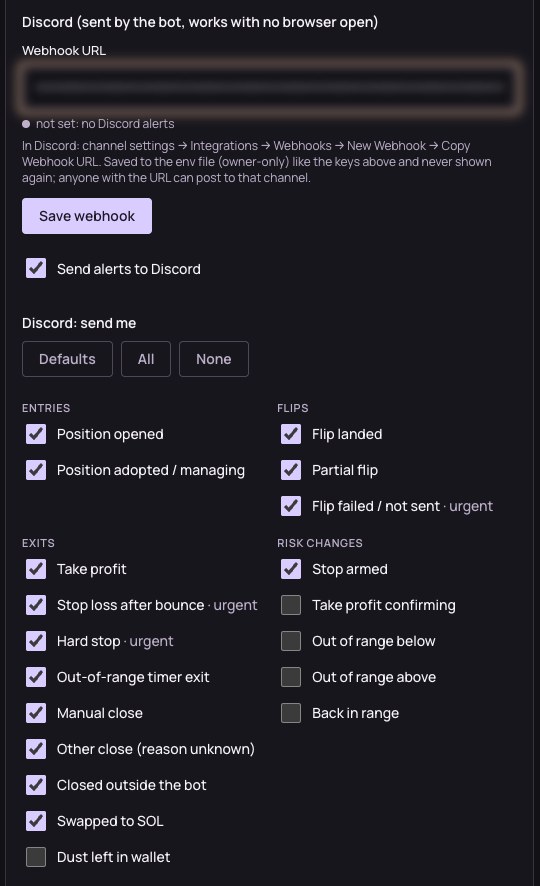
Settings → Alerts → Discord. The webhook URL is blurred here: treat it like a password.
- Create a webhookIn Discord: channel settings → Integrations → Webhooks → New Webhook → Copy Webhook URL.
- Save itIn Settings → Alerts → Discord, paste the URL and Save webhook. It's written to the env file as
DISCORD_WEBHOOK_URL(owner-only permissions), shown only as "saved" afterwards, and never returned by/api/statusor written to the logs. - Test itSend test alert posts a clearly labelled TEST message and shows the Discord message id or the exact error (invalid webhook, rate limited, network). Send sample of each type posts one SAMPLE per alert type. A URL typed but not saved yet is tested instead of the saved one.
- Pick what to sendEach alert type is its own toggle (same list as desktop), with Defaults · All · None. Send alerts to Discord switches them all off without forgetting the webhook. Click Save Discord settings.

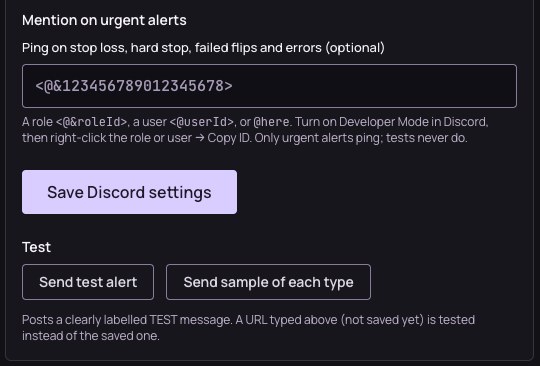
Mention on urgent alerts, and the test buttons.
Mention on urgent alerts: an optional role
<@&roleId>, user <@userId> or @here, added only to urgent alerts: stop loss, hard stop, failed flips and errors. Tests never ping.Messages are embeds coloured by outcome (green: flip landed, profit close, compounded; red: stops, loss close, errors; amber: warnings; blue: opened / managing; grey: simulated). Close embeds include the reason, PnL % and SOL, value at close, hold time, flips and Solscan links. Sends are queued one at a time within Discord's limit (5 per 2 s), honour
429 retry_after, drop the oldest beyond 50 queued, and never hold up the bot. If Discord answers 401 / 403 / 404 the webhook is gone or wrong: alerts pause until you save a new URL or a test succeeds.Environment variables
Everything above can also come from the environment (for example Railway Variables). A webhook saved in the dashboard wins.
| Key | Meaning | Default |
DISCORD_WEBHOOK_URL | https://discord.com/api/webhooks/<id>/<token>. A secret. | not set |
DISCORD_MENTION | ping on urgent alerts, e.g. <@&roleId>, <@userId>, @here | none |
DISCORD_INCLUDE_SIM | also send simulated (shadow) events | false |
DISCORD_ALERTS | false keeps the webhook saved but sends nothing | true |
DISCORD_AVATAR_URL | optional https image for the webhook avatar / embed author | none |
Anyone with the webhook URL can post to that channel. Don't paste it in screenshots, issues or chats. If it leaks, delete the webhook in Discord and save a new one.
Telegram (optional)
Set
TELEGRAM_BOT_TOKEN and TELEGRAM_CHAT_ID to receive send-only alerts in a Telegram chat. These work with no dashboard tab open. Risk-change alerts (out of range, back in range…) are not sent to Telegram.On phones the bell is available, but browser notifications on mobile are limited; Discord or Telegram are more reliable there.