

Dashboard tour

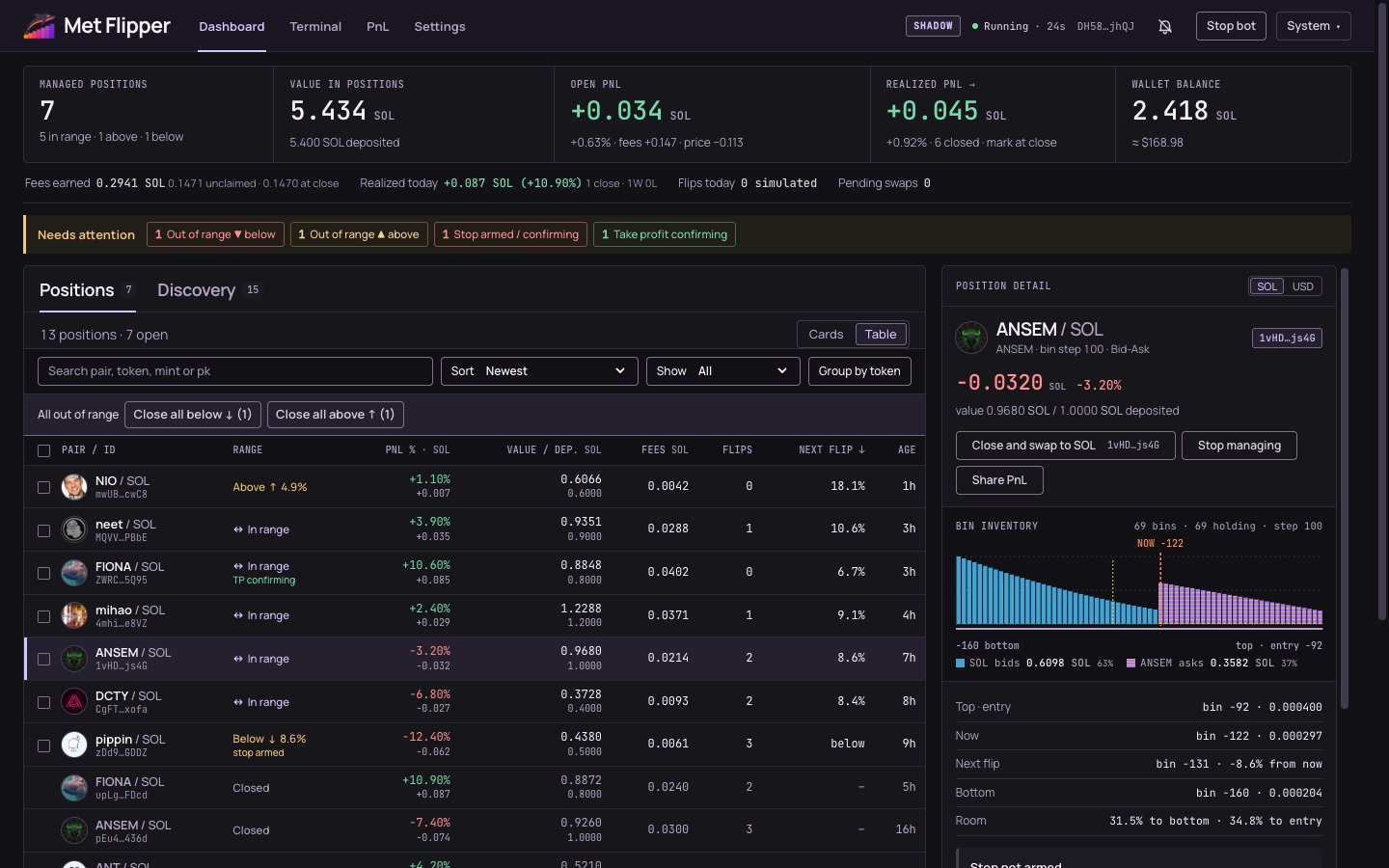
Dashboard with demo positions (shadow mode): KPI ledger, needs-attention strip, Positions in Table view, the position detail panel and Activity.
The screenshots on this site come from a watch-only test instance with demo positions on real public pools. The numbers are illustrative, not results.
Header
One row across the top (it wraps on narrow screens):
- Met Flipper and the page nav: Dashboard · Terminal · PnL · Settings.
- Mode badge (
SHADOWorLIVE) and the run status: Running or Stopped, time since the last check, the bot wallet's short address, andwatch-onlywhen there is no key. - Bell: desktop alerts on or off (see Alerts).
- Stop bot / Start bot. Stopped means no flips, closes or swaps; the bot keeps reading.
- System ▾ opens a small panel: last check, check interval, RPC host, wallet (and whether it can sign), the running version (with a restart hint when the code on disk is newer) and the Light / Dark theme switch.
Switching Shadow / Live lives in Settings → Mode & flip. Type is Instrument Sans for text and Geist Mono for numbers.
KPI ledger


KPI ledger, stat line and the needs-attention strip.
The ruled top row shows Managed positions (in range / above / below), Value in positions (vs deposited), Open PnL (SOL and %, split into fees and price), Realized PnL (links to the PnL page) and Wallet balance. Under it, one stat line: fees earned (unclaimed and at close), realized today (closes, wins / losses), flips today and pending swaps.
Needs attention
A strip appears only when something needs you: Out of range ▼ below, Out of range ▲ above, Stop armed / confirming, Take profit confirming, Waiting for Confirm and manage, Closing and Last error. Each chip shows a count; click it to filter the list to those positions, click again to clear. The browser tab title also shows how many are out of range, for example
(2 OOR).Positions and Discovery tabs
The work area has two tabs with counts: Positions and Discovery.
In Positions you can:
- Search by pair, token, mint or position key.
- Sort by newest, PnL %, PnL SOL, value, out-of-range distance or next flip closest.
- Show all, in range, out of range, closed or not managed.
- Group by token.
- Switch Cards | Table. Table rows expand to the full card; Cards have Compact all / Expand all.
Your sort, filter, grouping and view are saved in the browser. While your pointer is over the list it holds still for a few seconds, so rows don't jump under the cursor; urgent changes (closed, out of range, stop or take profit) still show at once.

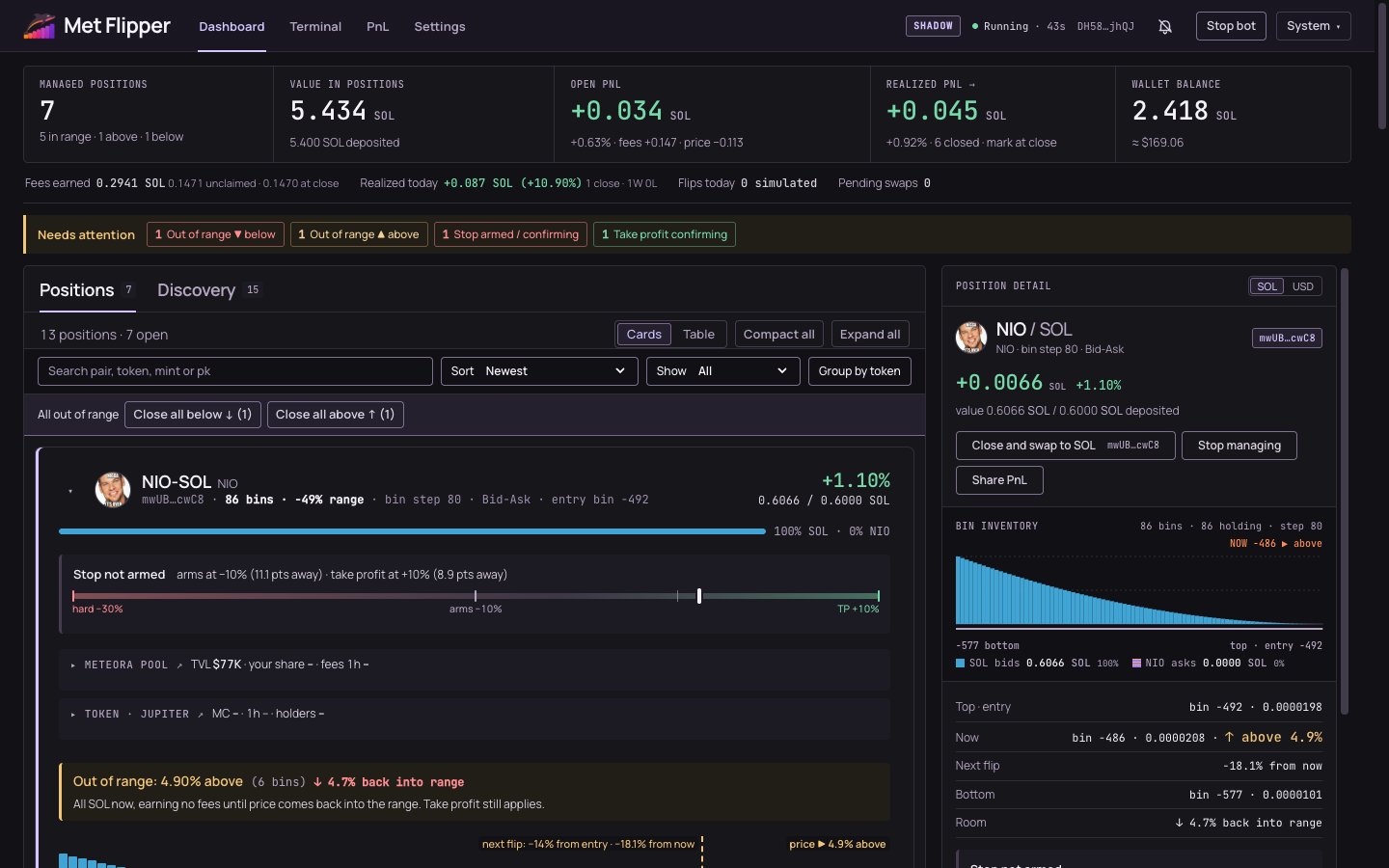
Cards view: the full position card with exit strip, pool and token rows, and the live bin chart.
Position detail panel

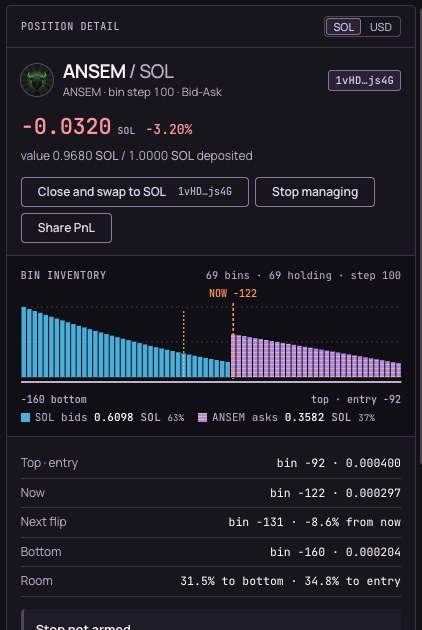
Position detail: PnL, actions, the size-weighted bin inventory with a SOL | USD switch, and the range lines.
Click a row (or its pair) to inspect it in the right-hand panel. It refreshes on every poll and shows:
- PnL in SOL and %, value vs deposit, and the actions Close and swap to SOL, Stop managing, Share PnL.
- Bin inventory: a histogram of your bins weighted by size, SOL bids in blue below price and token asks in purple above, with SOL | USD.
- Top / entry, now, next flip, bottom and the room left in range, then the exit strip, flips, fees, the sell style picker and links to Meteora, the token and Solscan.
A position card

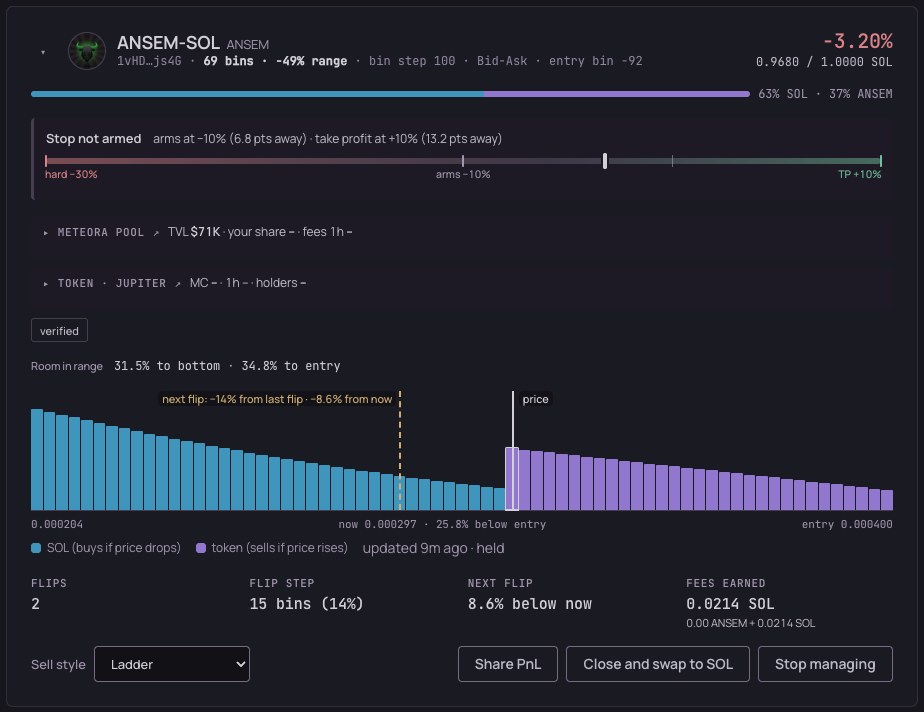
A full position card.
- SOL / token split bar, the exit strip (stop armed or not, hard stop, arm level and take profit, with the hard-stop and TP labels kept inside the card) and room in range.
- Meteora pool, Jupiter token and GMGN rows (GMGN needs an API key).
- Live bin chart: SOL bins below price, token asks above, the next-flip line and the price line. Optional per-flip colors.
- Flips, flip step, next flip, fees earned, the Sell style picker, and the actions.
A position found already holding token, with no usable deposit history, shows Confirm and manage. Nothing is signed for it until you click.
Bulk close
Tick rows (square checkboxes) or use Close all below ↓ / Close all above ↑ for out-of-range positions. A contextual toolbar shows the selection and Close selected (n).

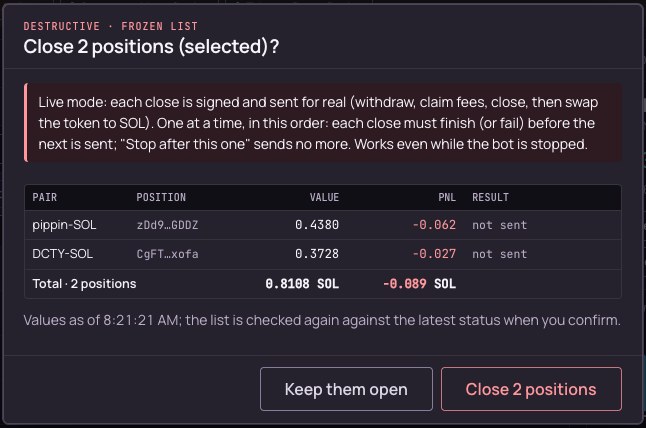
One confirm dialog lists every position with its value and PnL. Live mode shown.
The dialog freezes the list and re-checks it against the latest status when you confirm. In Live mode the closes run one at a time, in order: each close (withdraw, claim fees, close, swap the token to SOL) must finish or fail before the next is sent, and every row shows its real result. Stop after this one sends no more. It works even while the bot is stopped. In Shadow mode closes aren't available (the bot has no close simulation), and with a watch-only wallet there is no key to sign them.
Activity

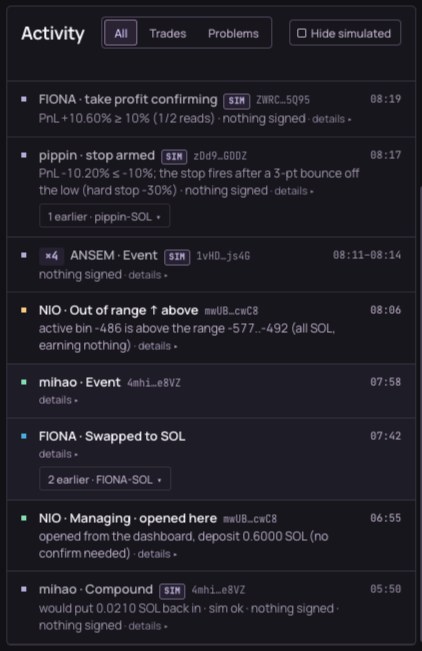
Activity: same-position runs grouped, simulated repeats collapsed into ×N.
One line per event, newest first, filtered by All · Trades · Problems. Runs of events for the same position fold into "n earlier", repeated simulated lines collapse into ×N with a time range, and real trades stand out. Hide simulated keeps only real activity. Each line has details ▸ and Solscan links where there is a transaction.
History and the PnL calendar moved to their own page: the PnL & history → link under the dashboard (and the Realized tiles) open PnL.